
WordPress Abilities API: What It Is and How It Works
Most WordPress developers still don’t know what the Abilities API is. They have heard about it in the same sentence as “AI” and “MCP” and filed it under “later”. It isn’t complicated, and once it clicks, a lot of things about WordPress and AI fall into place.
What the Abilities API is
The Abilities API is the list of what your site can do — and what it allows. That’s it. Nothing more, nothing else.
WordPress core, your theme and your plugins each add their own entries to that list. Every entry (an ability) says three things:
- What it is: a name like
core/get-site-infoorforwp-seo-helper/get-meta, a label and a description. - What it takes and returns: an input schema and an output schema (JSON Schema).
- Who may call it: a
permission_callback.
The Abilities API is part of WordPress core since 6.9. Core already registers its own abilities, for example core/get-site-info, core/get-user-info and core/get-environment-info.
How it works
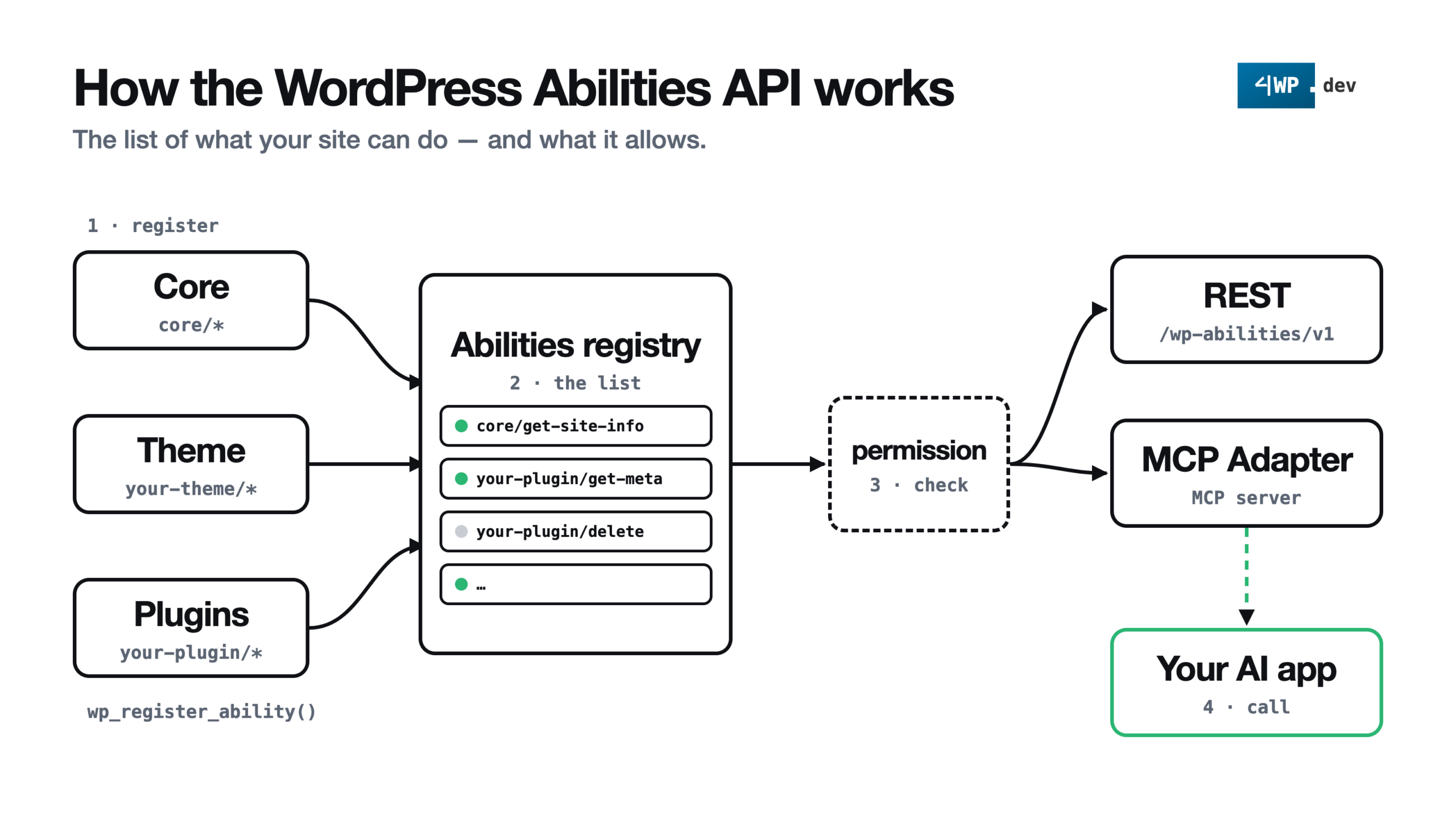
- Register. Core, the theme and plugins call
wp_register_ability()on thewp_abilities_api_inithook. Categories are registered first, withwp_register_ability_category()onwp_abilities_api_categories_init. - The list. Every ability lands in one registry. Any code can read it with
wp_get_abilities(),wp_get_ability()andwp_has_ability(). - Check. Before an ability runs, WordPress validates the input against the schema and calls its
permission_callback. - Call. The same list is available over REST (
/wp-json/wp-abilities/v1/) and, through the official MCP Adapter plugin, to AI apps over MCP.
A real registration from our 4WP SEO Helper plugin (shortened):
add_action( 'wp_abilities_api_init', function () {
	wp_register_ability(
		'forwp-seo-helper/get-meta',
		[
			'label'               => __( 'Get SEO meta of a post', '4wp-seo-helper' ),
			'description'         => __( 'SEO meta of one post or page by ID or slug.', '4wp-seo-helper' ),
			'category'            => 'forwp-seo-helper',
			'input_schema'        => [ /* id or slug */ ],
			'output_schema'       => [ /* raw and effective SEO meta */ ],
			'execute_callback'    => [ $this, 'get_meta' ],
			'permission_callback' => [ $this, 'can_read' ], // current_user_can( 'edit_posts' )
			'meta'                => [
				'annotations' => [ 'readonly' => true, 'destructive' => false, 'idempotent' => true ],
			],
		]
	);
} );
The plugin describes what it can do. It doesn’t care who calls it: a REST client, a block in the editor or an AI agent.
The challenges for developers
- What to put on the list. Not every function deserves to be an ability. Pick actions a person would actually ask for.
- Schemas. Input and output must be described precisely, or the agent guesses.
- Permissions. Reading is not writing. Each ability needs its own
permission_callback, never__return_truefor anything that changes data. - Namespace = owner. Use your plugin slug as the prefix (
forwp-seo-helper/…), so anyone can see whose ability it is. - Testing without an agent. Check every ability over REST or in code before you hand it to an AI.
Benefits
- The big one: you manage your favourite WordPress site from your favourite AI app.
- One standard instead of a custom API in every plugin.
- The site itself says what it can do.
- Input is validated against the schema before your code runs.
- Permissions live in one place.
- One list for REST, MCP and JavaScript.
Risks
- Write actions with a weak
permission_callback. - The
publicflag inmeta(ormeta.mcp.public) makes an ability available to the MCP Adapter. - Abilities that do too much at once.
- An agent running destructive actions.
All of these are easy to prevent. Add a custom connector that replaces the default MCP server and gives you one more layer of permission control. That’s what we built in 4WP MCP Connector:
- the MCP Adapter default server is turned off — the agent sees only the
4wpserver; - every ability is off by default;
- the administrator turns abilities on one by one, grouped by owner (core, theme, plugins);
- every call is logged: time, user, ability, status — without inputs and outputs.
Practical case
From an empty list to a working AI connection: abilities switched on in the admin, a password, a one-file connector, and the AI app already knows what your site can do.
Conclusion
This is the starting point. Let’s dive in and let our clients enjoy their favourite things with their favourite tools.
There is much more to come about the Abilities API.