
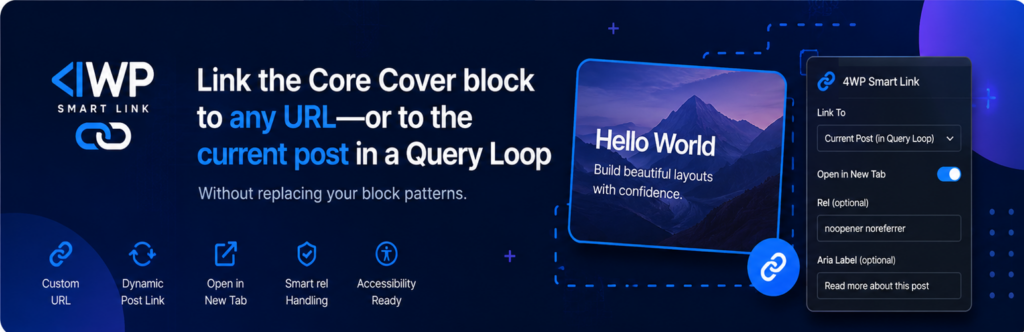
4WP Smart Link: Make Any Gutenberg Block Clickable — Cover, Group & Column in Query Loop
4WP Smart Link is a free WordPress plugin that makes Cover, Group, and Column blocks fully clickable on the front end — without custom CSS, without wrapper blocks, and without breaking nested links. Add it to a Query Loop post template and the whole card becomes a single tap target that opens the post, while internal links (post title, tags, buttons) keep working independently.
The Missing “Clickable Block” Feature for WordPress Gutenberg
Since 2022, the WordPress Gutenberg team has had open feature requests to make the Cover block and the entire Query Loop post card clickable — not just the title or image, but the whole block area. As of WordPress 7.0 the core editor still doesn’t solve this natively.
The workarounds developers reach for are messy: wrap everything in a raw <a> tag (invalid HTML when there are nested links inside), write custom CSS with position: absolute pseudo-elements, or install a heavy page-builder plugin just to get a linked container. None of these work cleanly inside a Query Loop, where each card needs to resolve to its own post URL dynamically.
4WP Smart Link adds a Smart Link option to the block toolbar of Cover, Group, and Column blocks and handles both cases correctly — blocks with no inner links (clean anchor wrap) and blocks that already contain a post title, categories, or buttons (host mode, where clicks on empty space open the URL while nested links stay independent).
Perfect For
- Clickable post cards in a Query Loop — visitors click anywhere on the card (image, padding, background) to open the post; the post title, categories, tags, and buttons keep their own separate links
- Cover block heroes linked to a landing page — make an entire hero section one tap target, or hook into WordPress core lightbox with “Enlarge on click”
- Group or Column card layouts — portfolio grids, service cards, team member blocks, social link cards — any layout where the whole visual unit should behave as a single clickable component
- FSE and classic themes — works with any block theme or classic theme that uses Gutenberg blocks
How 4WP Smart Link Works
- Select a Cover, Group, or Column block in the Gutenberg editor.
- Click Smart Link in the block toolbar.
- Choose a link mode: Custom Link (any URL), Post Link (dynamic permalink inside a Query Loop post template), or — for Cover blocks with an image background — Link to image file or Enlarge on click (WordPress core lightbox).
- Check the live result in Preview or on the published page. (The editor canvas doesn’t always reflect the front-end click area.)
The plugin auto-detects whether the block contains nested links. With no inner links, it wraps the block markup in a standard <a> element (anchor mode). When inner links are present, it switches to host mode: stores the URL in a data-forwp-smart-link-url attribute and uses a lightweight front-end script so clicks on empty space open the URL while nested anchors remain fully independent — no invalid link-in-link HTML, no accessibility violations.
Key Features
- Three supported blocks — Cover, Group, Column, with no extra wrapper block required
- Automatic anchor vs. host mode — clean
<a>wrap when no inner links; JS host mode when inner links are present, avoiding invalid nested-anchor markup - Post Link mode — resolves the current post’s permalink dynamically inside a Query Loop post template
- Cover-specific modes — link to image file URL or trigger the WordPress core lightbox (Enlarge on click) with a single setting
- Link options — custom URL, open in new tab, nofollow, accessibility label
- Developer filters —
forwp_smart_link_supported_blocks,forwp_smart_link_has_inner_links,forwp_smart_link_use_host_modefor fine-grained control
4WP Smart Link vs. Other Ways to Make a WordPress Block Clickable
Making an entire Gutenberg block clickable is a common need with no native WordPress solution. Here’s how the available approaches compare for the most common use case: clickable post cards inside a Query Loop.
| Approach | Works in Query Loop | Handles inner links | No custom CSS or code | Valid HTML / accessible | Core blocks only |
|---|---|---|---|---|---|
| 4WP Smart Link | Yes — Post Link mode | Yes — host mode auto-detected | Yes — toolbar UI only | Yes — no link-in-link output | Yes |
CSS position: absolute pseudo-element | Manual (permalink hardcoded) | Partial (z-index conflicts) | No — custom CSS required | Depends on implementation | Yes |
| Twentig “Stretch link” on Group block | Yes (inside Query Loop) | Yes | Yes — sidebar toggle | Yes | No — requires Twentig theme plugin |
| GenerateBlocks linked container | Yes | Yes | No — CSS still needed | Depends on CSS method | No — requires GenerateBlocks |
Raw <a> wrap in HTML block | No (static URL only) | No — invalid HTML | No — manual HTML editing | No — link-in-link is invalid | Yes |
Twentig’s “Stretch link” is the closest like-for-like alternative, but it requires the Twentig theme plugin to be active. 4WP Smart Link works independently of any theme or theme plugin, on any block or classic theme that uses Gutenberg.
Installation
- Upload the plugin folder to
wp-content/plugins/, or install the ZIP through Plugins → Add New. - Activate 4WP Smart Link through the Plugins screen.
- Select a Cover, Group, or Column block in the editor → click Smart Link in the toolbar → choose your link mode.
- Preview or publish, then test clicks on the front end.
Requirements
| WordPress version | 6.4 or higher |
| PHP version | 7.4 or higher |
| Tested up to | WordPress 7.0 |
| Current version | 1.2.1 |
| Theme requirement | None — works with any theme |
Frequently Asked Questions
Which blocks does 4WP Smart Link support?
Cover, Group, and Column blocks from the WordPress core block library. Additional blocks can be added via the forwp_smart_link_supported_blocks filter.
How do I make a post card in a Query Loop fully clickable?
Place a Cover, Group, or Column block inside the Query Loop post template. Select it, open Smart Link in the toolbar, and choose Post Link. Each card will resolve to that post’s permalink on the front end. Check the result in Preview or on the published page.
What happens if the block already has a post title, buttons, or category links inside?
The plugin detects inner links automatically and switches to host mode: clicks on empty areas (background, padding, image) open your Smart Link URL, while inner anchors — post title, tags, buttons — remain fully independent. No nested <a> tags are output, so the HTML is valid and accessible.
What does “Enlarge on click” do on a Cover block?
It hooks into the WordPress core lightbox (the “Enlarge on click” behaviour available on Cover blocks with an image background), so clicking the block opens the image in a lightbox overlay using the native WordPress implementation — no third-party lightbox library needed.
Does 4WP Smart Link work with my theme?
Yes — it works independently of any theme or theme plugin. It does not require Twentig, GenerateBlocks, or any other third-party plugin. It runs on both FSE block themes and classic themes that use Gutenberg.
The click area looks different in the editor — is that a bug?
No. Smart Link runs on the published front end. The block editor canvas may show a different click area than the live site — always use Preview or check the published page to test the actual behavior.
What happens if the Smart Link URL field is left empty?
The block renders and behaves exactly as it would without the plugin — no extra markup, no broken click areas.
Can I use “Post Link” outside a Query Loop?
Post Link resolves dynamically only when the block is inside a Query Loop post template. Outside a Query Loop, use Custom Link and enter a fixed URL.
Does it depend on other 4WP plugins?
No. 4WP Smart Link is completely standalone.
Need Clickable Card Layouts or Custom Query Loop Development?
Clickable post cards are one of the most common patterns in FSE block theme development — and one of the most time-consuming to get right when the card contains multiple inner links, dynamic permalinks, and responsive spacing. 4wpdev builds custom Gutenberg block themes, Query Loop layouts, and WordPress plugin development for agencies and product teams who need these patterns built correctly and maintainably. If you need a fully custom post card system, a linked block grid, or a WordPress development partner who works in SOLID and DDD architecture, see 4wp.dev.
More Plugins from 4wpdev
4WP Smart Link is part of a growing set of WordPress tools built by 4wpdev, including 4WP Drive (Google Docs to WordPress), 4WP Style Switcher (dark mode and style variations), 4WP Weather (Gutenberg weather block), and 4WP FAQ (FAQPage JSON-LD for Accordion blocks). See the full list on the 4wpdev WordPress.org profile.
Development and Contributing
4WP Smart Link is open source. Source and issue tracker are available in the public GitHub repository. Theme authors can style .forwp-smart-link-wrapper on the front end. Editor-only classes (forwp-smart-link-cover-panel*) are not stable for theme CSS.
“4WP” is our project brand name — “WP” appears only as part of that name and is not a reference to WordPress. This plugin is not affiliated with, endorsed, or sponsored by WordPress.