
Development · Headless & Decoupled ·
Authentication for Headless
Authentication for Headless WordPress: Beyond Cookies and Nonces
Introduction
WordPress’s native authentication — a login cookie plus a nonce tied to that session — works because the browser is always talking to the same origin that rendered the page. A headless frontend breaks that assumption on day one: it usually lives on a different domain, sometimes a different port, and the cookie-and-nonce model was never built to survive that boundary.
The Challenge
Cross-origin cookies mean CORS configuration, SameSite policy decisions, and CSRF exposure all become explicit engineering problems instead of things WordPress quietly handled for you. A nonce’s lifetime is tied to a WordPress session that a decoupled frontend often has no clean way to establish in the first place. The result: teams either leave the default cookie auth on and watch cross-origin write requests silently fail, or they open the API wide open “to make it work,” which is worse.
Standards and Best Practices
Use Application Passwords for trusted server-to-server or build-time integrations — a CI pipeline pulling content at build time, for instance — where the credential never touches a browser. For end-user authenticated actions initiated from the frontend, put a dedicated JWT or OAuth2 layer in front of the REST/GraphQL API instead of relying on WordPress cookies at all. Never send WordPress admin credentials from client-side code under any circumstance. Scope every token to a custom capability that matches exactly what the frontend needs — never manage_options “because it works” — and prefer short-lived tokens with a refresh flow over long-lived static keys that can’t be revoked cleanly.
Practical Application
The request flow a token-based headless auth setup follows in practice:
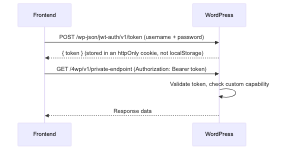
Enforcing that check on the WordPress side, scoped to a real capability rather than a blanket admin check:
register_rest_route( '4wp/v1', '/account/settings', array(
	'methods'             => 'GET',
	'callback'            => 'forwp_get_account_settings',
	'permission_callback' => function( WP_REST_Request $request ) {
		return current_user_can( 'forwp_read_account_settings' );
	},
) );
Potential Challenges
A JWT can’t easily be invalidated before its expiry without maintaining a server-side blocklist, which reintroduces some of the statefulness token auth was meant to avoid. CORS misconfiguration is a silent failure mode in both directions: too strict, and legitimate frontend requests get blocked with no obvious error; too permissive (Access-Control-Allow-Origin: * on an authenticated endpoint), and you’ve opened the API to any origin on the web. And auth logic now lives in two places — the WordPress plugin issuing and checking tokens, and the frontend SDK attaching them — that have to stay in sync as either one changes.
Common Mistakes
Storing tokens in localStorage, which is readable by any script on the page and turns a single XSS vulnerability into full account takeover — an httpOnly cookie is not readable by JavaScript at all and closes that door. Leaving the default cookie-and-nonce REST auth enabled for a cross-origin frontend and then debugging “random” authentication failures that are actually just SameSite cookie rules doing exactly what they’re designed to do. Granting the API user or token administrator capabilities “just to make it work” instead of defining the one or two custom capabilities the frontend actually needs.
When It’s Better to Bring In a Specialist
Authentication is the one area of a headless build where a shortcut doesn’t just cause a bug — it causes a breach. A WordPress developer with security-focused headless experience designs the token scope, CORS policy, and revocation strategy against the specific threat model of the project, rather than reusing a generic tutorial setup that was never audited for it. For anything handling real user accounts or payment-adjacent data, a dedicated security review as part of WordPress development services is worth the cost before launch, not after an incident.
FAQ
Only if the frontend shares the exact same origin as WordPress, which is rare in a real headless setup. Across origins, cookie-and-nonce auth runs into CORS and SameSite restrictions that will block legitimate requests unpredictably — a token-based scheme avoids the problem entirely.
Trusted, non-browser integrations — a build pipeline, a server-side script, an internal tool — where the credential is stored securely server-side and never exposed to a browser or end user.
An httpOnly, Secure, SameSite-appropriate cookie, not localStorage or sessionStorage. Client-side JavaScript should never be able to read the token directly.
By design, a JWT itself can’t be invalidated early without extra infrastructure — most setups maintain a short server-side blocklist of revoked token IDs, checked on each request, or simply keep token lifetimes short enough that revocation matters less.
Usually a CORS or SameSite cookie restriction blocking the request before it reaches WordPress at all — the browser, not WordPress, refuses to send or accept the credentials, which often shows no clear error in application logs.
Before launch, specifically the token scope, CORS configuration, and revocation strategy — these are far cheaper to get right in design review than to discover through an incident once real user accounts depend on them.
Headless & Decoupled
WordPress as a content backend — REST or GraphQL APIs, auth, preview, and modern JavaScript frontends.
Headless & Decoupled
When and how to decouple WordPress from the frontend — architecture, trade-offs, and 4WP production patterns.
REST as Headless Backend
Expose posts, pages, and custom content via WP REST for SPAs and static frontends.
GraphQL (WPGraphQL)
Flexible queries with WPGraphQL — schemas, connections, and headless data fetching.
Auth & Permissions
Application passwords, JWT, OAuth, and permission callbacks for decoupled clients.
Preview & Revalidation
Draft preview, on-demand revalidation, and keeping headless frontends in sync with WordPress.
Frontend (Next.js / SPA)
Next.js, React, and static frontends consuming WordPress — routing, ISR, and the 4WP Headless App.