The Premise
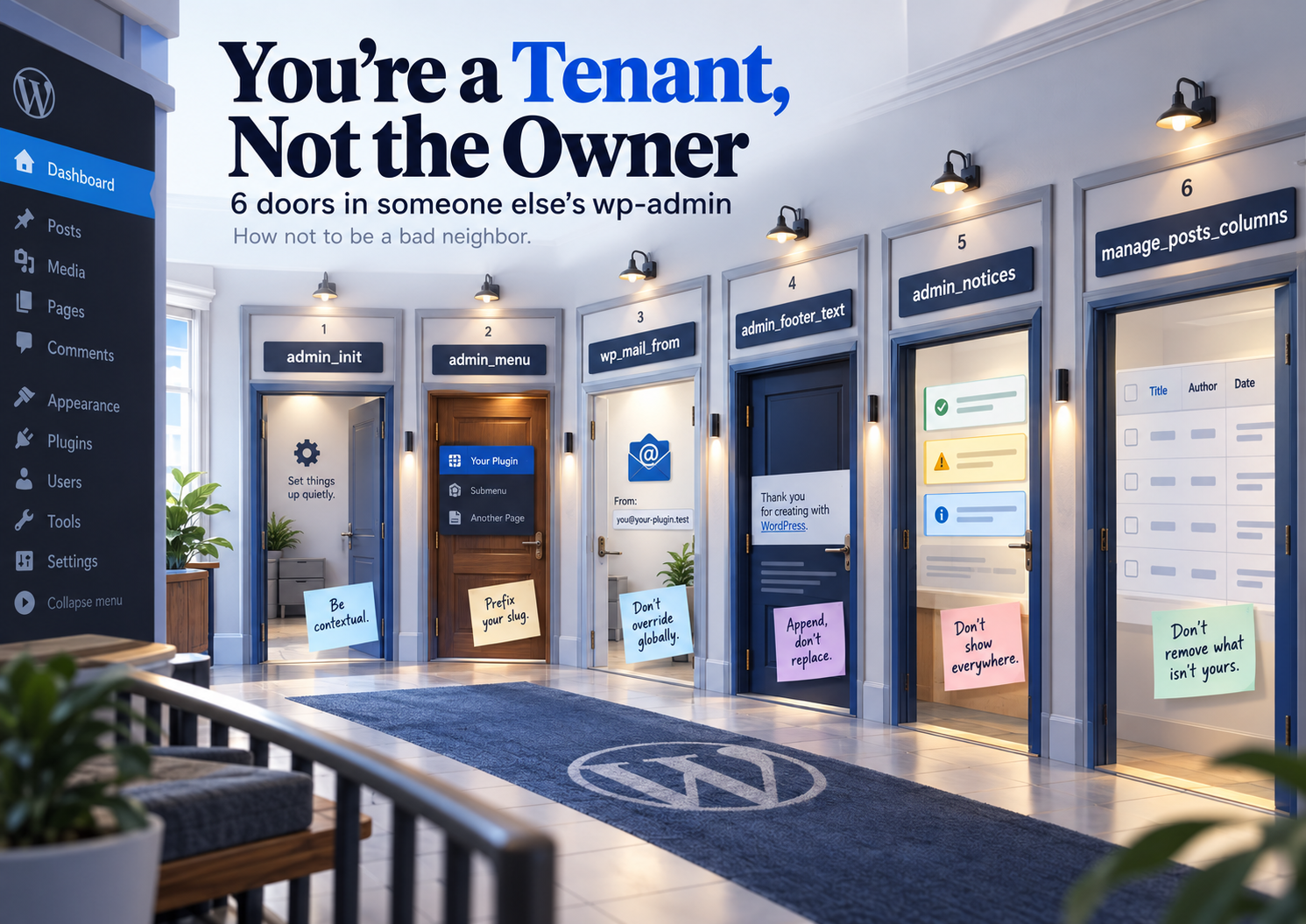
wp-admin isn’t yours. The owner is WordPress core, and every active plugin is a tenant with its own key to a shared apartment. The six hooks in this category are literally six doors you’ve been handed: you can walk in and set up your own corner, but dozens of other tenants live there too, and how you behave determines how comfortable it is for everyone — including the person who walks in there every day, the site administrator.
The Problem With a Bad Tenant
Typical signs of bad neighborly behavior in wp-admin: your plugin’s notice shows up on every single admin screen instead of just the relevant one; the footer text gets overwritten without checking whether someone already left something there — and two plugins keep erasing each other’s line; a menu item uses a slug that’s already taken by another plugin, so one of the two simply doesn’t show up; wp_mail_from gets silently hijacked, and an email that was supposed to come from a support service arrives with the “no-reply@” address of a completely different plugin.
None of these situations technically break the site. They break trust: the administrator sees a mess in their own dashboard and has no idea which plugin is responsible.
Rules of a Good Neighbor — One Per Hook
`admin_init` — move in quietly
add_action( 'admin_init', function() {
	if ( ! current_user_can( 'manage_options' ) ) {
		return;
	}
	register_setting( 'forwp_settings_group', 'forwp_api_key' );
} );
Don’t run heavy code or checks without a reason — this hook fires on EVERY load of every admin screen, for every user, not just administrators.
`admin_menu` — don’t block someone else’s door
add_action( 'admin_menu', function() {
	// A unique, prefixed slug — so you don't collide with another plugin.
	add_menu_page(
		'My Plugin',
		'My Plugin',
		'manage_options',
		'forwp-my-plugin', // not just 'settings' or 'dashboard'
		'forwp_render_settings_page'
	);
} );
A slug like settings or dashboard is a guaranteed conflict sooner or later. Prefix it with your plugin’s own name.
`wp_mail_from` — sign with your own name
add_filter( 'wp_mail_from', function( $original_email ) {
	// Only change the address for emails our own plugin sends,
	// don't hijack everything that goes through wp_mail() globally.
	if ( ! forwp_is_our_mail_context() ) {
		return $original_email;
	}
	return 'notifications@example.com';
} );
Globally overriding the sender address without checking context is a common reason an email from a completely different plugin suddenly arrives from the wrong address.
`admin_footer_text` — check if the wall is already taken
add_filter( 'admin_footer_text', function( $text ) {
	// Don't silently overwrite — add your own text while keeping what was already there.
	return $text . ' | Powered by My Plugin';
} );
A common reason one plugin’s footer text “disappears” is that another plugin simply replaces the whole string instead of appending to what’s already there.
`admin_notices` — don’t shout down the whole hallway
add_action( 'admin_notices', function() {
	$screen = get_current_screen();
	if ( ! $screen || 'toplevel_page_forwp-my-plugin' !== $screen->id ) {
		return; // Show it only on our own screen, not everywhere.
	}
	echo '<div class="notice notice-success is-dismissible"><p>Settings saved.</p></div>';
} );
A notice with no screen check and no is-dismissible class is exactly why administrators dread plugin updates: the banner stays on every page until someone manually cleans up the code.
`manage_posts_columns` — rearrange the furniture, don’t throw out what isn’t yours
add_filter( 'manage_posts_columns', function( $columns ) {
	// Add our own column without removing what others put there.
	$columns['forwp_status'] = 'Status';
	return $columns;
} );
Removing someone else’s columns from the array without a clear reason is like throwing a neighbor’s furniture out of the hallway just because it was in your way.
When It’s Better to Bring In a Specialist
These rules become especially critical when wp-admin needs to be “branded” for a client — stripping the WordPress logo, showing only your own footer text, hiding menus that aren’t relevant to a given user role. That’s classic agency or freelance work, and doing it carefully — without breaking the client’s other plugins in the process — is exactly where WordPress development services earn their keep: an experienced WordPress developer knows which hooks are safe to fully override, and where you should only append.
FAQ
Most often, two or more plugins are filtering admin_footer_text, and each returns its own string instead of appending to what it received. The last registered filter “wins” and erases the others.
Because admin_notices fires on every admin screen by default. You need an explicit check of the current screen via get_current_screen(), otherwise the banner shows up everywhere.
Technically yes, but without a clear reason it’s bad practice — the column might have been added intentionally for a client’s needs or another plugin. Only remove what genuinely duplicates your own plugin’s functionality.
Always prefix the slug with a unique plugin identifier (forwp-settings, not just settings). It’s the simplest and most reliable way to avoid colliding with other plugins or the theme.
By default, for every email sent through wp_mail(), including emails from other plugins and WordPress core itself. If you only want to change the address for your own emails, you must check the context inside the filter.
When you need to hide or rebrand the dashboard for a client in a way that won’t break their other plugins or get in the way of future updates. That’s exactly the level of nuance (context checks, prefixing, appending carefully instead of replacing) where experience with these specific hooks saves hours of rework.
Summary
A full breakdown of each of the 6 hooks in this category — with examples and a hands-on IDE — is on the Admin Hooks page, and the whole set is also available as one PDF to keep.