Let’s use a real case — a routine client request to make a Cover block’s photo clickable in FSE Gutenberg — to walk through what client-centricity, thoughtful design, and scalability actually look like in WordPress development.
Let’s dive into WordPress development — domain first, integration second.
There can be plenty of ideas for a new plugin. But more often than not — and it’s more honest to admit this — a real tool is born not from an abstract idea, but from a specific client request, or a problem that surfaces in the middle of a project.
4WP Smart Link is exactly that kind of case.
The request behind the plugin
For several years now, the priority has been the FSE Gutenberg approach: a pattern or a page fully administered by the user, with nothing hardcoded into the theme. Gutenberg moves fast, and the progress is impressive — but there are still moments a client considers obvious that simply aren’t there in the default core blocks.
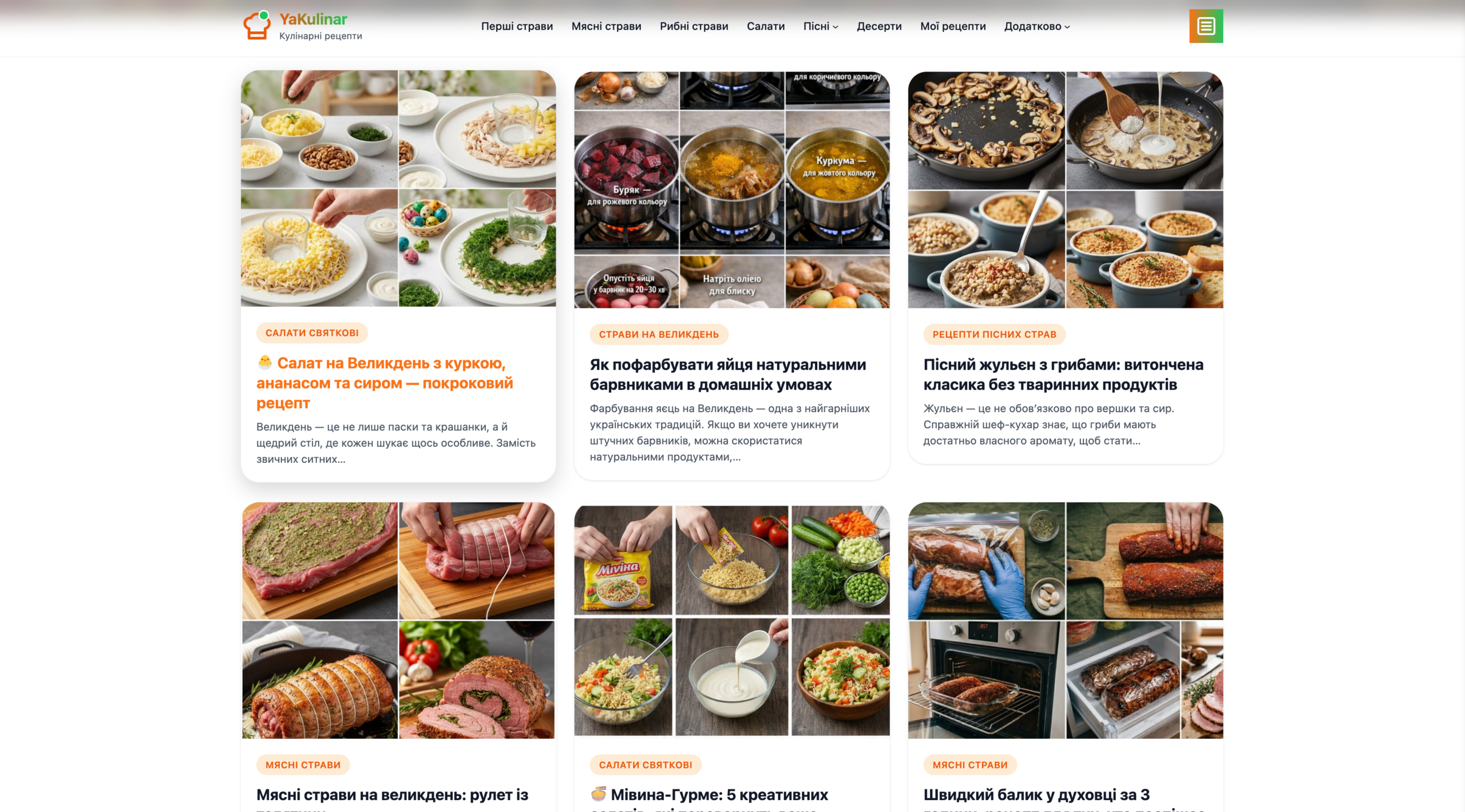
One of them: inside a Query Loop there’s a single-post template, and inside that template there’s a Core Cover block with “Use featured image” turned on. But that core block itself has no option to add a link — not to the post, not to anything. The client’s request here is the plainest one there is: click a photo in a news list, land on the article. Especially on mobile, where the photo is the largest, easiest tap target on the card. It’s a genuinely client-centric, everyday request, not a whim — that’s how 9 out of 10 sites in the world work, regardless of what they’re built on.
The irony is that we’re using the most modern approach — FSE Gutenberg — and the Core Cover block inside a Query Loop still can’t be linked to the post it belongs to. That’s not our own hunch: this exact problem has been discussed for years in the Gutenberg developer community itself — Cover Block: allow it to become a link to the post inside a Query Loop, issue #42252, plus the related Post Featured Image: Add Link Settings, issue #46762, and even an attempted implementation via pull request that never made it into core. In other words, this is a recognized, documented gap — not a preference of ours.
The request repeated on almost every FSE Gutenberg project. Most often it was closed with an extra function baked into the theme — a snippet here, a hook there. It worked, but it was a one-off fix that had to be carried, by hand, from project to project.
From a custom fix on every project to a public plugin
On one project — the YaKulinar.com.ua culinary portal — the decision was made not to write yet another one-off snippet, but to build something that closes this small request, and others like it that seem minor but matter this much, once and for good, for any project after it. That’s how 4WP Smart Link came about: a plugin that makes Cover, Group, and Column blocks fully clickable in Gutenberg and in the Query Loop — no wrapper block, no custom code per project.
How it works: two modes, one rule
The simplest technical fix is to just wrap the whole block in an <a> tag. But that breaks the links already inside it: a post title, a button, a tag — anything nested in a Cover/Group/Column that already carries its own link becomes unclickable.
So the fix isn’t “how to wrap a block in a link” — it’s a distinction between two things:
- The link source — the block itself (Cover, Group, Column, or a Query Loop card), which decides where the URL comes from: a custom link or a link to the current post.
- The click behavior — whether the block contains its own interactive elements (a button, a linked title) that need to keep priority over the outer click.
That gives two modes, not one universal wrapper:
- Anchor mode — the block is wrapped entirely in <a class=”forwp-smart-link-wrapper”>, when there’s nothing inside it that needs its own link preserved.
- Host mode — the block stays exactly as it is, and the click is attached via data-forwp-smart-link-url, when there are interactive elements inside that need to keep their own link priority.
That one rule — the outer click target defers to the inner interactive elements — doesn’t care whether it’s a Cover, a Group, or a Query Loop card. That’s why the plugin works equally well on hero covers and on news-feed cards.
What came next — built from practice, not ideas
After the first real-world use, a few more requests came in — each from an actual project:
Link a whole group. The ability to apply one link to a group of elements at once. Similar functionality already existed as separate plugins on the market (one of them had even been used before) — but now it’s built directly into 4WP Smart Link, with no need to run a second plugin alongside it.
A lightbox for a group of companies. The next challenge was a project for a group of companies spanning several tech directions, needing a compact, convenient way to present them on one page. Core Image/Cover blocks have “Enlarge on click” — but only as a static, single-image view. Built on top of 4WP Smart Link, the images were combined into a classic lightbox with navigation between enlarged photos right on the page — that’s how the page lightbox gallery feature came about.
Featured images in FSE templates. One more challenge: a featured image on single-post templates needed to open correctly not just when it’s manually placed in the content, but also when it’s pulled dynamically from the template itself. That’s a different rendering mechanism — and it’s exactly where host mode earned its keep.
Why this is a “WordPress Methodologies” story, not just a plugin note
Anchor mode and host mode aren’t a technical detail for its own sake — it’s the same principle behind the provider contract in 4WP-Booking or the registry in 4WP-FAQ: a clear rule decides the behavior, and the specific block or integration is just an implementation detail. Every plugin is built on the shared 4wp-bundle foundation, which is exactly why a new requirement gets added as an extension of the rule, not a rewrite of the plugin.
The best solution isn’t the one born from an idea
If 4WP Smart Link had been built “because it sounded good,” it would most likely still be a wrapper <a> hack around the Cover block. Instead, every feature it has — grouping, the lightbox gallery, host mode for FSE templates — showed up as an answer to a specific request from a real project, tested in production, and refined by feedback after it shipped.
Where 4WP Smart Link stands today
The plugin is live and available on WordPress.org (version 1.3.0, WordPress 6.4+, PHP 7.4+).
Author and architect of the solution — Anatoliy Dovgun.
Sources
- 4WP Smart Link — plugin page on WordPress.org
- 4WP Smart Link on GitHub
- Video walkthrough of 4WP Smart Link on YouTube
- YaKulinar.com.ua — the project that started the plugin
- Gutenberg issue #42252 — Cover block link to post inside a Query Loop
- Gutenberg issue #46762 — Post Featured Image: Add Link Settings
- Gutenberg PR #40488 — an attempted implementation
- 4wp-bundle on GitHub