Quick interview trap: which WordPress hook fires first?
Ask ten WordPress developers “which hook runs first?” and nine will say init. The sharper ones say plugins_loaded. Almost nobody says muplugins_loaded — and that’s exactly why interviewers who know their stuff love asking it.
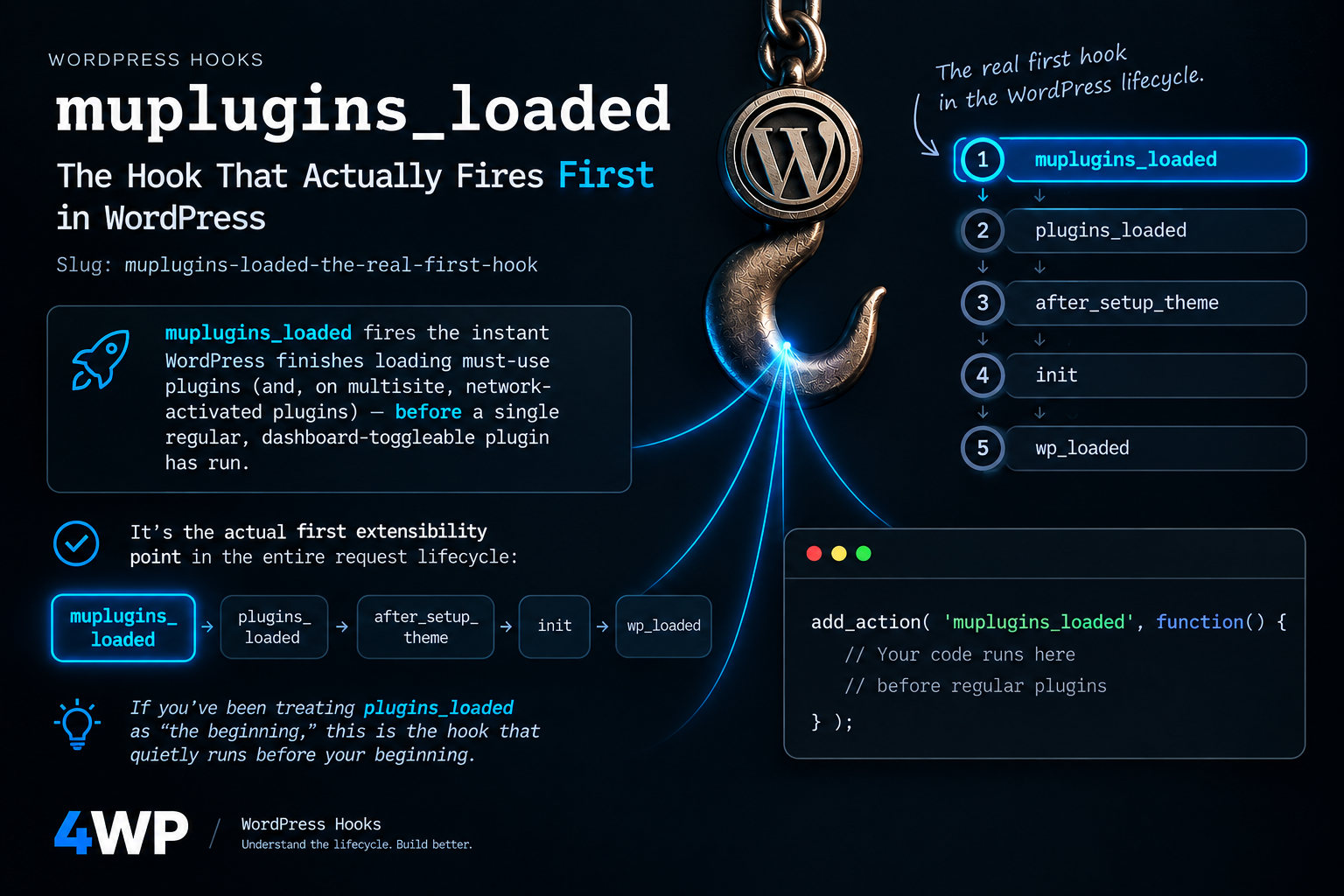
muplugins_loaded fires the instant WordPress finishes loading must-use plugins (and, on multisite, network-activated plugins) — before a single regular, dashboard-toggleable plugin has run. It’s not a trick question with a technicality buried in the docs. It’s the actual first extensibility point in the entire request lifecycle:
muplugins_loaded → plugins_loaded → after_setup_theme → init → wp_loadedIf you’ve been treating plugins_loaded as “the beginning,” this is the hook that quietly runs before your beginning.
Why this hook deserves more than trivia-night attention
Most tutorials skip muplugins_loaded because mu-plugins themselves are a niche corner of WordPress — most sites never touch the wp-content/mu-plugins/ folder. But that niche is exactly where it stops being trivial:
Nothing can turn it off. A regular plugin can be deactivated from wp-admin by a client, a junior dev, or a compromised admin account. Code that runs on muplugins_loaded — inside a mu-plugin — cannot. That single property is why agencies and enterprise WordPress shops treat this hook as the anchor point for anything that must run no matter what else happens to the site.
Nothing has loaded yet. Every regular plugin’s classes, functions, and constants are still unavailable. That’s a constraint, but it’s also the point — it makes muplugins_loaded the only place you can guarantee your code executes before any third-party plugin has had a chance to register a filter, override a constant, or do anything at all.
It sets the timing baseline for everything after it. If you’re profiling performance, enforcing a security posture, or coordinating multisite network plugins, you need a hook that fires before the variables you’re measuring change. muplugins_loaded is that reference point.
Practical use, and why it matters for security-conscious and large projects
This is where muplugins_loaded stops being a fun fact and starts being infrastructure.
Un-bypassable security hardening. Security rules placed in a regular plugin are only as strong as the “is this plugin still active” checkbox. Put them in a mu-plugin hooked to muplugins_loaded, and they run on every single request — including requests where something has gone wrong elsewhere. Typical patterns: force security headers before any output buffering starts, hard-block known-bad request patterns, or kill-switch a compromised third-party plugin by short-circuiting its hooks before it gets a chance to register them.
Licensing and compliance enforcement. Agencies shipping client sites use mu-plugins to enforce things clients shouldn’t be able to accidentally switch off — a maintenance contract check, a required security plugin, a compliance flag. muplugins_loaded is the earliest reliable point to make that enforcement unconditional.
Multisite network coordination. On a multisite install, this hook also fires after network-activated plugins load, which makes it the natural place to react to network-wide plugin state before any per-site plugin runs — useful for shared authentication, network-wide feature flags, or centralized logging that every subsite must inherit.
Precise performance profiling. If you want to measure “how long did WordPress’s plugin-loading phase actually take,” you need a timestamp taken before regular plugins load, not after. muplugins_loaded is the only hook that gives you that starting line.
Constants that must exist before anything else runs. Defining environment flags, debug constants, or feature toggles here guarantees every plugin loaded afterward sees a consistent, already-decided configuration — no race condition where plugin A checks a constant that plugin B hasn’t defined yet.
Code examples
Basic — confirm you’re actually first
add_action( 'muplugins_loaded', function() {

    error_log( 'Bootstrap started.' );

} );
Real case — a boot-time constant for performance profiling
add_action( 'muplugins_loaded', function() {
    if ( ! defined( 'MY_PLUGIN_BOOT_TIME' ) ) {
        define( 'MY_PLUGIN_BOOT_TIME', microtime( true ) );
    }
} );
Security-hardening pattern — enforced from an mu-plugin, unaffected by wp-admin
// wp-content/mu-plugins/force-security-baseline.php
add_action( 'muplugins_loaded', function() {
    if ( ! headers_sent() ) {
        header( 'X-Content-Type-Options: nosniff' );
        header( 'X-Frame-Options: SAMEORIGIN' );
    }
    // Runs before any regular plugin can filter it away.
    add_filter( 'xmlrpc_enabled', '__return_false' );
} );
Edge case — the mistake almost everyone makes here
add_action( 'muplugins_loaded', function() {
    // Regular plugins are NOT loaded yet — calling a function
    // defined by a normal plugin here will fatal-error.
    // my_regular_plugin_function(); // <- fatal error
} );
Common mistakes
- Assuming it only fires when mu-plugins exist. It doesn’t — WordPress calls this hook unconditionally on every request, whether the mu-plugins folder has files in it or not.
- Calling a regular plugin’s function from inside it. Regular plugins haven’t loaded yet; that’s what plugins_loaded is for. Reaching for a function from another plugin here is a guaranteed fatal error.
- Using it for anything that belongs on init. Registering post types, taxonomies, or shortcodes here is premature — WordPress itself isn’t fully bootstrapped yet. Use muplugins_loaded only for what genuinely needs to run before regular plugins, not as a default “run early” habit.
FAQ
Does muplugins_loaded fire if I have no mu-plugins at all? Yes. WordPress calls this hook unconditionally on every request, whether wp-content/mu-plugins/ has files in it or is empty.
Can I use functions from my regular plugins inside a muplugins_loaded callback? No — regular (non-mu) plugins haven’t loaded yet at this point. That’s exactly what plugins_loaded is for.
Is this hook multisite-only? No. It fires on every WordPress install. On multisite, it additionally fires after network-activated plugins load — which is the one place its behavior meaningfully differs from a single-site install.
Does anything run before muplugins_loaded? Yes, but not through the hook system: wp-config.php, and drop-ins like sunrise.php or advanced-cache.php if present, execute earlier. muplugins_loaded is the first point regular hook-based code can run — not the first line of PHP WordPress executes overall.
Try it: the bootstrap sequence, hands-on
Below this article is a practice IDE loaded with a curated set of hooks — the actual bootstrap chain, in the order WordPress fires them, so you can see where muplugins_loaded sits relative to the hooks you already use every day:
- muplugins_loaded — the true first hook; must-use and network-activated plugins are loaded, nothing else has run yet.
- plugins_loaded — every regular active plugin now exists; the standard place for cross-plugin dependency checks.
- after_setup_theme — the theme’s functions.php has run; theme support flags are safe to read.
- init — WordPress itself is fully loaded; the default home for registering post types, taxonomies, and shortcodes.
- wp_loaded — WordPress, plugins, and theme are all fully loaded; the last general-purpose bootstrap hook before request-specific logic takes over.
(Note: setup_theme — the hook between plugins_loaded and after_setup_theme — isn’t in the catalog yet. Say the word and I’ll add it so the sequence above is fully unbroken.)
Explore each hook’s full reference page, or jump straight to plugins_loaded to see the very next thing that happens after this one.