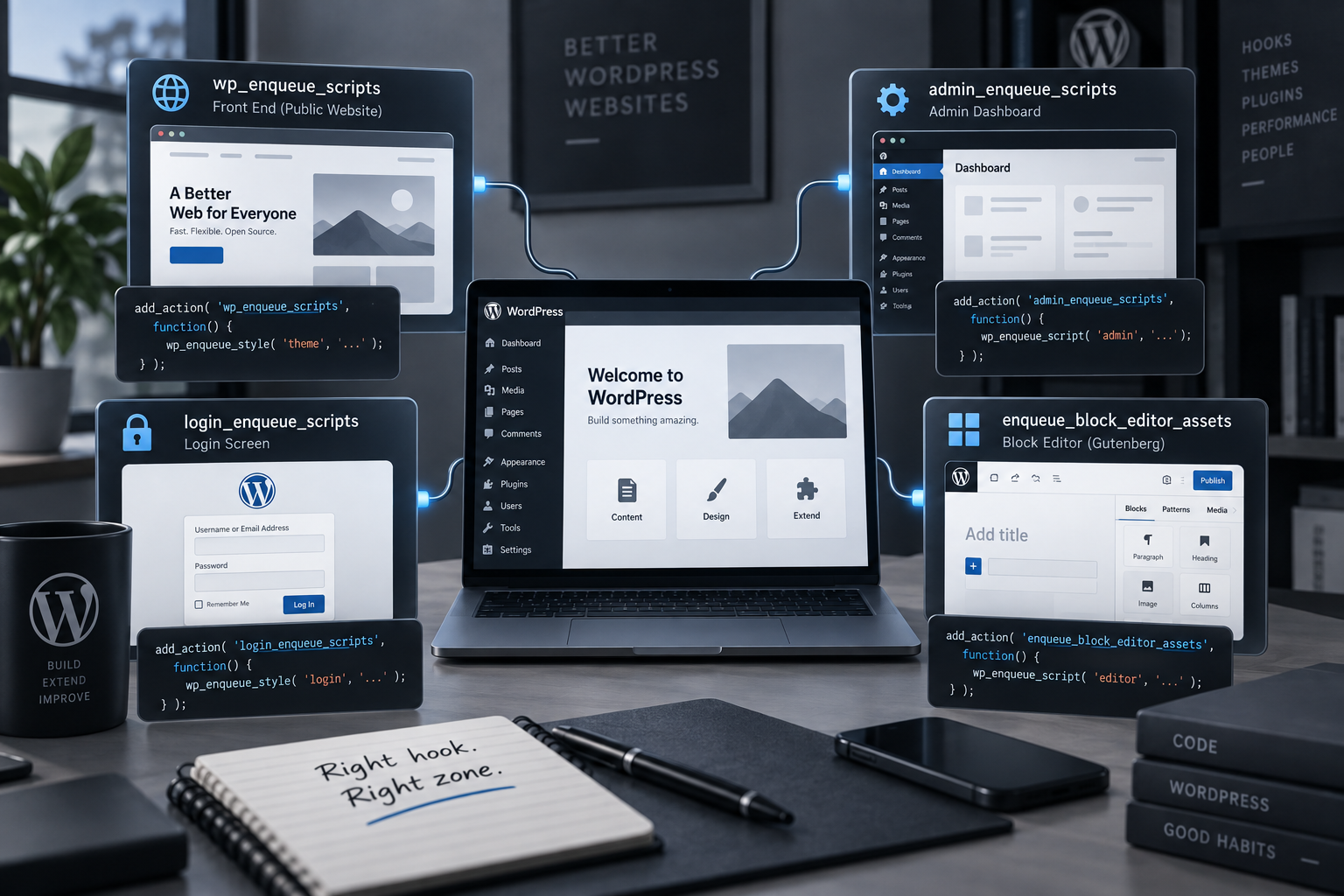
On the surface, these five hooks all do the same thing — load CSS/JS. But four of them sound almost identical while each one runs in a different zone of the site. Mix them up, and block styles leak onto the front end where nobody asked for them, or the Gutenberg editor is left with no styling at all.
Which zone each hook covers
Hook Front end Admin Block editor
wp_enqueue_scriptsadmin_enqueue_scriptsenqueue_block_editor_assetsenqueue_block_assetsFront end — the standard hook for anything a site visitor sees:
add_action( 'wp_enqueue_scripts', function() {
	wp_enqueue_style( 'theme-main', get_stylesheet_uri() );
	wp_enqueue_script( 'theme-main', get_template_directory_uri() . '/assets/main.js', array(), '1.0', true );
} );
Admin — a separate hook that only runs inside wp-admin:
add_action( 'admin_enqueue_scripts', function( $hook_suffix ) {
	wp_enqueue_style( 'my-plugin-admin', plugins_url( 'admin.css', __FILE__ ) );
} );
Block editor only — styles and JS for the editing screen that never reach the front end:
add_action( 'enqueue_block_editor_assets', function() {
	wp_enqueue_script( 'my-block-editor', plugins_url( 'editor.js', __FILE__ ) );
} );
Editor and front end at once — a single hook that fires in both places. This is exactly where CSS belongs when a block needs to look the same in the editor and on the live site:
add_action( 'enqueue_block_assets', function() {
	wp_enqueue_style( 'my-block-style', plugins_url( 'block.css', __FILE__ ) );
} );
A common mistake is reaching for enqueue_block_assets when you actually need enqueue_block_editor_assets (or vice versa): the style either shows up somewhere it shouldn’t, or fails to show up where it should.
admin_enqueue_scripts and performance: check $hook_suffix
The hook passes $hook_suffix — an identifier for the current admin screen — for exactly this reason: so you don’t load files everywhere.
// Bad: this CSS/JS loads on EVERY wp-admin screen —
// every post, every settings page, the media library.
add_action( 'admin_enqueue_scripts', function() {
	wp_enqueue_style( 'my-plugin-admin', plugins_url( 'admin.css', __FILE__ ) );
} );

// Good: only on the plugin's own screen.
add_action( 'admin_enqueue_scripts', function( $hook_suffix ) {
	if ( 'toplevel_page_my-plugin' !== $hook_suffix ) {
		return;
	}
	wp_enqueue_style( 'my-plugin-admin', plugins_url( 'admin.css', __FILE__ ) );
} );
This is one of the most common reasons wp-admin feels slow: every plugin loads its files on every screen “just in case,” when they’re only needed on one.
script_loader_tag: a targeted fix, not a blanket filter
When you need to add async/defer to a specific script, the worst approach is filtering every tag without checking $handle — that can break the load order of scripts you don’t own (jQuery dependencies, for example). The right way is to target by handle:
add_filter( 'script_loader_tag', function( $tag, $handle, $src ) {
	if ( 'my-plugin-widget' !== $handle ) {
		return $tag;
	}
	return str_replace( ' src', ' defer src', $tag );
}, 10, 3 );
The filter only applies to scripts registered through wp_enqueue_script() — one more reason not to print <script> tags by hand (more on that in the Head & Meta article).
Summary
Before you write add_action, answer one question first: where exactly does this file need to load — front end, admin, editor, or editor and front end at once. Picking the right hook here solves 80% of problems with missing or leaking styles. A full breakdown of every hook with examples and a hands-on IDE is on the Enqueue Hooks category page, and the whole set is also available as one PDF.