Let’s use a real case — a dental clinic and its appointment booking — to walk through what client-centricity, domain thinking, and scalability actually look like in WordPress development.
Let’s dive into WordPress development — domain first, integration second.
Most WordPress booking plugins start the same way: a client needs to connect their site to a specific tool, so a developer wires up that one API and ships it. It works — until the second client shows up with a different calendar system, and the “quick integration” has to be rebuilt from scratch.
4WP-Booking started from exactly that kind of request — a dental practice that needed native, on-site appointment scheduling connected to Clinic Cards, the CRM it already ran on. But instead of shipping a “Clinic Cards plugin,” we treated the request as a design problem first and an integration second. This article walks through why, using Domain-Driven Design and a lightweight Software Design Document process — the same methodologies we apply across every plugin built on 4wp-bundle.
The request behind the plugin
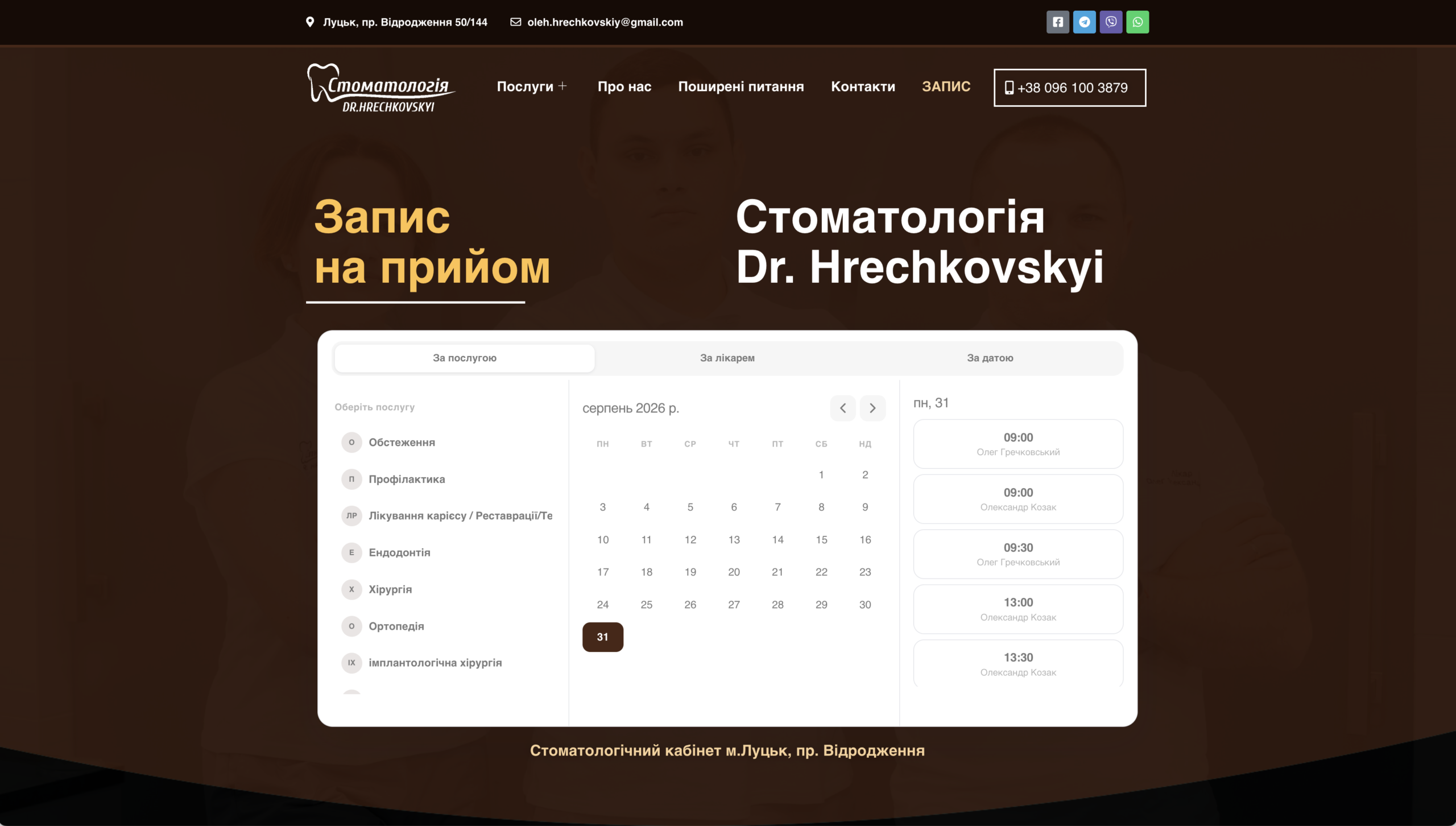
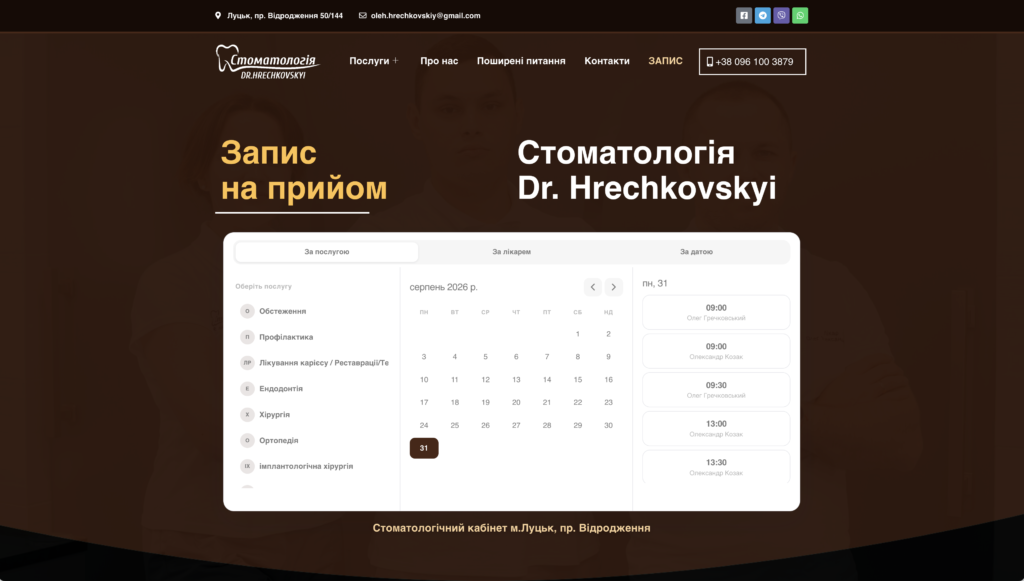
The trigger for 4WP-Booking was a real, live clinic: Dr. Hrechkovskyi’s dental practice in Lutsk. Patients needed to pick a service, a doctor, or a date, see real availability, and book directly from the clinic’s WordPress site — without a phone call, and without the clinic’s staff re-entering anything into Clinic Cards by hand.
That’s a completely reasonable, narrow request. The trap is answering it narrowly. If “booking” is modeled as “talk to the Clinic Cards API,” every future requirement — a second CRM, a different industry, a client who uses Google Calendar instead of a clinic system — turns into a rewrite. If “booking” is modeled as its own domain, with Clinic Cards as one way of fulfilling it, the plugin can grow without breaking.
That distinction is the whole argument for Domain-Driven Design, and it’s why we reached for it here instead of just shipping an API wrapper.
Modeling booking as a domain, not an API call
DDD starts from a simple premise: the business model should drive the architecture, not the other way around. Before writing anything, we asked what “booking” actually means, independent of Clinic Cards:
- An appointment is an entity — it has an identity, a status, and a lifecycle (requested, confirmed, completed, cancelled) that persists regardless of which calendar system stores it.
- A time slot and a service are value objects — defined entirely by their attributes, not by identity.
- The provider — Clinic Cards today, something else tomorrow — is a detail the domain depends on, not the thing the domain is built around.
Framed this way, Clinic Cards stops being the foundation of the plugin and becomes an implementation of a contract. WordPress itself plays the same supporting role: it renders the calendar, exposes the shortcode and Gutenberg block, and stores configuration — but the booking logic doesn’t know it’s running inside WordPress, and it doesn’t know it’s talking to Clinic Cards. That separation is what “domain logic stays independent and portable” means in practice, and it’s the reason the same approach scales to every plugin in the 4WP ecosystem, not just this one.
Sketching the SDD before writing a line of integration code
Where DDD answers how the domain is modeled, a Software Design Document answers how the system gets built — architecture, data flow, and build order, captured before implementation rather than discovered during it. For 4WP-Booking, that meant working through five questions up front:
- Requirements — What’s the MVP? Book by service, by doctor, or by date; capture patient name, phone, email; nothing more.
- Architecture — How do the pieces talk to each other? A WordPress-facing surface (block, shortcode, optional Elementor widget), a booking domain layer, and a provider layer behind an interface.
- Data model — Where do appointments, providers, and credentials live, and what depends on what?
- Data flow — How does a click on “9:00 AM, Dr. Kozak” become a confirmed slot in Clinic Cards and a confirmation on screen?
- Implementation order — Build the provider contract first, the Clinic Cards implementation second, the WordPress surfaces last — so the parts most likely to change (the UI) depend on the parts least likely to change (the domain), and not the reverse.
Roughly, the shape that came out of that process looks like this:
WordPress surface → Shortcode · Gutenberg block · Elementor widget
(interchangeable, no domain knowledge)
Booking domain → Appointment · Service · Availability
(framework-agnostic, provider-agnostic)
Provider contract → a single interface every calendar
integration must satisfy
Providers → Clinic Cards (live)
Google Calendar (planned)
Calendly (planned)
Nothing above this diagram’s provider layer needs to change when a new provider is added. That’s the point of designing the document before the integration: it turns “add Calendly support” from an architectural risk into a scheduling decision.
Why the provider stayed pluggable
Clinic Cards is a strong first provider for a reason — it’s purpose-built for clinics, which was exactly what the originating request needed. But the WordPress booking market is much bigger than clinics, and two names dominate general-purpose scheduling: Google Calendar, which almost every business already uses, and Calendly, which has become the default “just send me a link” tool for services and consultations.
Because the provider sits behind a contract rather than being hard-coded into the domain, both are roadmap items rather than rewrites. The domain doesn’t need to know whether “check availability” means calling Clinic Cards’ schedule endpoint or reading free/busy blocks from a Google Calendar — it only needs an answer that fits the same shape. That’s the practical payoff of doing the domain modeling and the design document first: the second and third integrations get cheaper instead of more expensive.
API keys, and why the server holds them
One WordPress-specific decision is worth calling out on its own: where credentials live. 4WP-Booking keeps every provider API key — the Clinic Cards token today, a Google or Calendly credential tomorrow — on the server side, inside WordPress. The browser never sees it. Every call to the provider’s API is made from WordPress itself, not from the visitor’s session, which matters as soon as more than one provider (and more than one client’s credentials) is in play. It’s a small architectural rule, but it’s the kind of rule that’s easy to skip when a plugin is built as a one-off integration and much harder to skip when it’s designed as a domain with a provider contract from the start.
Why this is a “WordPress Methodologies” story, not just a plugin note
DDD explains how to model the domain. SDD explains how to plan the build. Neither replaces the other, and neither is specific to booking — they’re the same methodologies we use across the 4WP plugin family, from 4WP Smart Link to 4WP FAQ to 4WP Weather, all built on the shared 4wp-bundle foundation. The pattern holds regardless of the vertical: identify the domain independent of the first integration, document the structure before building it, and keep the provider — CRM, calendar, weather API, whatever it is — behind a contract instead of woven through the plugin.
That discipline is also why a client request that starts this specific — “connect my WordPress site to Clinic Cards” — is worth treating as a platform decision rather than a one-off script. It costs more up front than an API wrapper would. It costs a lot less the second time a client asks for something adjacent.
When it’s worth bringing in an architect
Not every booking integration needs this much ceremony. A single site, a single provider, no plans to reuse the plugin elsewhere — that’s a legitimate case for a lighter-weight, direct integration, and DDD’s own guidance is to skip the heavier patterns for exactly that kind of simple, low-complexity build.
But the moment a project needs to support more than one provider, more than one client with different requirements, or a booking flow with real business rules attached (cancellation policies, deposits, multi-staff scheduling), it’s worth having a developer who thinks in domains and design documents, not just endpoints — someone who can own the provider contract and the data model as the integration list grows, rather than patching a new if branch in for every new calendar service. That’s the difference between a plugin that supports Calendly next quarter and one that has to be rebuilt to support it.
Where 4WP-Booking stands today
4WP-Booking is live and open source on GitHub, and its Clinic Cards integration is running in production on Dr. Hrechkovskyi’s clinic site today. It’s currently working through the WordPress.org plugin review process, with submission planned once the current plugin ahead of it in the queue clears verification. Google Calendar and Calendly support are next on the roadmap — and thanks to the provider contract the domain was built around, adding them is a matter of implementing the interface, not redesigning the plugin.
Sources
- 4WP-Booking plugin page
- 4WP-Booking on GitHub
- Dr. Hrechkovskyi Dental Clinic — live booking example
- Domain-Driven Design — 4wp.dev methodologies
- Software Design Document (SDD) — 4wp.dev methodologies
- 4wp-bundle on GitHub