
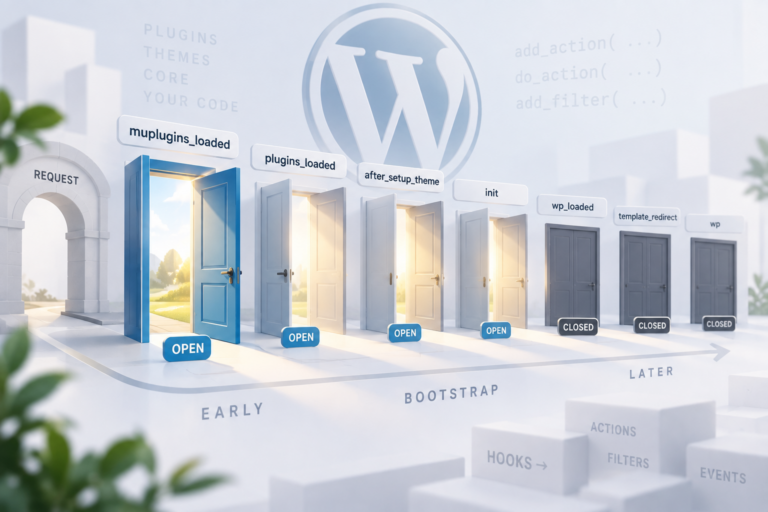
Action Hook since 0.71

init

Runs after WordPress has finished loading

Description

init is the default place to register post types, taxonomies, and rewrite-related APIs. It fires after plugins are loaded and before headers go out.

When it runs

Every front and admin request, after plugins_loaded and before wp_loaded. Too late for some must-use bootstrap, too early for the main query.

Signature

do_action( 'init' );

Examples

Basic

add_action( 'init', function() {
    register_post_type( 'book', [
        'public' => true,
        'label'  => 'Books',
    ] );
} );

Register a public CPT on init so rewrite rules and admin menus see it.

Real case

add_action( 'init', function() {
    register_taxonomy( 'genre', 'book', [
        'public'  => true,
        'show_ui' => true,
    ] );
} );

Register a custom taxonomy alongside the post type.

Common Use Cases

  • Register custom post types
  • Register custom taxonomies
  • Start sessions
  • Load text domains (plugins)

Common mistakes

  • Registering post types in plugins_loaded — too early for some APIs — or in wp_loaded when rewrites already ran
  • Running heavy, unconditional logic on init — it fires on every single request (front-end, admin, AJAX, cron, and partially REST), so unguarded code here is a common site-wide TTFB killer.

Related hooks

FAQ

Why is my custom post type missing from the admin menu?

It usually means register_post_type() ran on a hook earlier than init, or the CPT registration code never executed on that request.

Why is my site slow on every page, not just one template?

init fires on every request type. Guard expensive logic with is_admin(), wp_doing_ajax(), or wp_doing_cron() so it only runs where it's actually needed instead of on every hit.

Source: wp-settings.php

Group wizard

One session: this hook, then each related_hooks entry. Walk it and tell us what to change.

init → admin_init → wp_enqueue_scripts

functions.php — init
functions.php
PHP init · Hook 1 of 3 · Step 1 of 7

Practice the init WordPress action hook in our interactive sandbox — a VS Code-style editor with a step-by-step init tutorial, add_action exercises, and instant feedback. No local WordPress install required.