
The Hook That Fires Twice: Why save_post Isn’t as Simple as It Looks
The Problem A developer hooks save_post to sync a post to an external service on every save. The code works in testing — one save, one sync call.…

Action Hook since 2.3.0
Fires whenever a post's status changes
transition_post_status is the only hook that reliably tells you a status changed — including the old value — which save_post cannot do.
Inside wp_insert_post()/wp_transition_post_status(), before the more specific {$new_status}_{$post_type} hooks.
do_action( 'transition_post_status', string $new_status, string $old_status, WP_Post $post );$new_status string — New post status.$old_status string — Previous post status.$post WP_Post — Post object.add_action( 'transition_post_status', function( $new_status, $old_status, $post ) {
if ( 'publish' === $new_status && 'publish' !== $old_status ) {
wp_mail( get_option( 'admin_email' ), 'Post published', get_the_title( $post ) );
}
}, 10, 3 );Send a notification only on the actual draft-to-publish transition.

The Problem A developer hooks save_post to sync a post to an external service on every save. The code works in testing — one save, one sync call.…
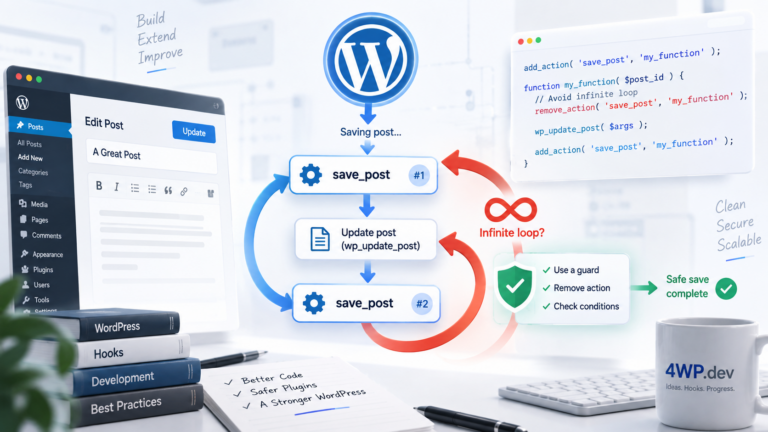
Why This Is Dangerous This isn’t some edge case — it’s one of the most common reasons a “simple” post save suddenly hangs the admin. The problem is…
Check that $new_status === 'publish' && $old_status !== 'publish' inside transition_post_status.
Source: wp-includes/post.php
One session: this hook, then each related_hooks entry. Walk it and tell us what to change.
transition_post_status → save_post
Practice the transition_post_status WordPress action hook in our interactive sandbox — a VS Code-style editor with a step-by-step transition_post_status tutorial, add_action exercises, and instant feedback. No local WordPress install required.